
Understanding FPS Monitors: What to Look For
When selecting the ideal FPS monitor for gaming, several critical features must be considered to ensure an optimal experience. The first of these is the refresh rate, which is expressed in hertz (Hz). A higher refresh rate, such as 144Hz or 240Hz, indicates that the monitor can display a higher number of frames per second (FPS), leading to smoother visuals, especially in fast-paced gaming scenarios. This capability is particularly crucial for First-Person Shooter (FPS) games, where every millisecond can make the difference between victory and defeat.
Response time is another essential specification to examine. It refers to the time taken for a pixel to transition from one color to another and is measured in milliseconds (ms). A low response time, ideally 1 ms to 3 ms, can significantly reduce motion blur and ghosting, ensuring that quick movements are rendered clearly. This clarity is vital in FPS games where rapid actions and reactions are commonplace.
Resolution should also be a key factor in your decision-making process. Common resolutions include 1080p (Full HD), 1440p (Quad HD), and 2160p (4K). Though higher resolutions provide sharper images, they demand more from both the gaming hardware and the monitor, hence balancing performance with visual quality is necessary.
Additionally, the type of panel utilized in the monitor affects color reproduction and viewing angles. IPS (In-Plane Switching) panels offer better color accuracy and wider viewing angles compared to TN (Twisted Nematic) panels, which generally have faster response times but poorer color performance.
Lastly, adaptive sync technology, such as VSync, G-Sync, and FreeSync, plays a vital role in reducing screen tearing and stuttering, thereby enhancing the overall gaming experience. These technologies synchronize the monitor’s refresh rate with the output of the graphics card, ensuring smooth gameplay.
Top 5 FPS Monitors for Gamers in 2025
When it comes to FPS gaming, the choice of monitor can significantly impact performance and gaming experience. Below is a detailed overview of the top five FPS monitors for gamers in 2025, selected based on expert reviews and user feedback.
1. ASUS ROG Swift PG259QN
This 24.5-inch monitor features a stunning 360Hz refresh rate, ensuring incredibly smooth gameplay. It boasts NVIDIA G-Sync technology to eliminate screen tearing and enhance visual clarity. With a response time of just 1ms, it minimizes lag for competitive gamers.
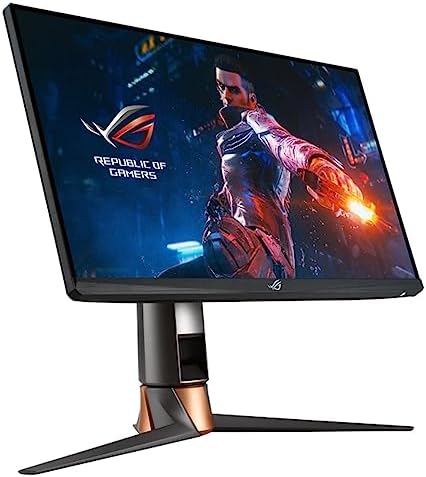
- 24.5-inch Full HD (1920 x 1080) Fast IPS panel and the world’s first 360Hz gaming monitor
- ASUS Fast IPS technology enables a 1 ms response time (GTG) for sharp gaming visuals with high frame rates.
- NVIDIA G-SYNC processor provides smooth, tear-free gaming at refresh rates up to 360Hz
2. Dell Alienware AW2521H
Another impressive option, the AW2521H offers a 25-inch display with a 360Hz refresh rate. This monitor supports NVIDIA G-Sync and includes HDR support for enhanced color depth. Its overall design and build quality reflect premium standards, making it a favorite among avid gamers.

- 16:9 widescreen resolution perfect for watching movies, playing video games and getting on with office work
- Aspect Ratio is 21:9; Viewing Angle is 178º (H) / 178º (V); Brightness is 400 cd/m²
- LED backlight technology provides for industry-leading low power consumption and less hazardous materials
3. AOC Agon AG271QG
This 25-inch monitor features a 240Hz refresh rate complemented by G-Sync technology, providing a flawless gaming experience. Its ergonomic design allows for adjustable height and tilt, catering to user comfort during extended gameplay sessions.

4. ViewSonic XG2431
With a 24-inch screen and a refresh rate of 240Hz, the XG2431 stands out for its affordability and performance. This monitor is compatible with multiple gaming consoles and devices, making it versatile for various gaming setups. The average price is around $350, offering excellent value without compromising quality.

- Premium Gaming Monitor: 24 Inch Full HD (1920x1080p) IPS gaming monitor with thin bezels
- Maximized Gameplay: 240Hz refresh rate and 0.5ms (MPRT) response time for ultimate gaming experience
- Ultra-Smooth Gaming: FreeSync Premium and NVIDIA G-Sync compatibility enables fluid and tear-free gameplay
5. LG 27GN950-B
This 27-inch 4K monitor features a 144Hz refresh rate and NVIDIA G-Sync, making it an exceptional choice for gamers seeking high-resolution graphics. Its impressive color accuracy and HDR support are ideal for immersive gameplay. The price for this monitor is approximately $799, reflecting its premium features.

- 27” UHD (3840 x 2160) Nano IPS Display.Mounting Type: Wall Mount.Response time:1.0 milliseconds.Specific uses for produc…
- Aspect Ratio is 16:9; Viewing angle is 178º (R/L), 178º (U/D); Brightness is 400nits (typ)
- IPS 1ms (GtG) 144Hz with VESA DSC Technology
Each of these monitors has unique features tailored for FPS gamers, combining high refresh rates, advanced synchronization technologies, and immersive displays. Selecting any of these top-tier options will enhance your gaming experience significantly.
Comparative Analysis of FPS Monitors
When considering the best FPS monitors for gaming in 2025, it is crucial to analyze various factors that can affect performance based on individual preferences and scenarios. Each monitor has its unique strengths and weaknesses, making the selection process highly subjective.
The first contender, known for its high refresh rate, is ideal for fast-paced gaming genres like first-person shooters (FPS). It delivers exceptionally smooth visuals, which can provide a competitive edge. However, it might come with a higher price tag, which could be a disadvantage for budget-conscious gamers.
Another monitor offers enhanced color accuracy and wider viewing angles, making it perfect for those who enjoy playing visually rich games. While it shines in image quality, its lower refresh rate can be a drawback for hardcore FPS gamers who prioritize speed over aesthetics.
For casual gamers, a monitor with moderate specifications might suffice, striking a balance between price and performance. These monitors typically provide a good gaming experience without overwhelming the user with advanced features. However, they may fall short in extreme competitive settings.
In contrast, monitors equipped with adaptive sync technology help eliminate screen tearing, crucial for maintaining a smooth gameplay experience. Those who play multiplayer FPS games may benefit significantly from this feature, although it is essential to ensure compatibility with their gaming setup.
Ultimately, the right FPS monitor for you will depend on your gaming environment and preferences. Whether your focus is on competitive gaming, visual fidelity, or a balanced budget, understanding the pros and cons of each option will guide you in making an informed decision. Evaluating your gaming habits and needs is key in identifying the ideal monitor from this competitive list.
Enhancing Your Gaming Setup
To elevate your gaming experience beyond just having a high-quality FPS monitor, it is essential to consider various additional features and accessories that can significantly enhance your setup. Among these, monitor mounts play a crucial role. Using adjustable mounts can help in optimizing the positioning of your monitor, allowing for better viewing angles and reducing neck strain during long gaming sessions. A well-positioned monitor not only improves comfort but can also enhance your overall gaming performance, especially in fast-paced titles where field of vision is critical.
Color calibration tools are another accessory worth investing in. These tools ensure that your monitor displays colors accurately, providing an enhanced visual experience. This is especially relevant for gamers who play titles where color differentiation is vital for gameplay. Accurate color representation can provide a competitive edge by allowing players to accurately assess their environment and make informed tactical decisions.
In addition to mounts and calibration tools, the quality of cables used to connect your FPS monitor is paramount. High-speed HDMI or DisplayPort cables can help maximize the monitor’s refresh rate and resolution capabilities, ensuring that you are not held back by inadequate transmission quality. Such cables minimize lag and maintain a smooth connection, thereby enhancing overall performance during intense gaming sessions.
Lastly, the significance of ergonomics should not be overlooked. A comfortable gaming environment is crucial for long hours of play. Consider an ergonomic chair and desk setup that complement the height and angle of your monitor. This setup minimizes physical strain and allows you to maintain focus on your gaming objectives without distractions caused by discomfort. By investing in these additional features and accessories, you can make the most of your FPS monitor and improve your overall gaming experience.